Manage Data Quality Rules
The Rules page allows Data Administrators to manage the library of Data Quality Rules used during the mapping process.
Data Quality Rules help check the quality of incoming source data before it is loaded into the CryspIQ® Enterprise Data Model. Rules can identify missing, invalid, inconsistent or poorly formatted data so issues can be reviewed and resolved early.
Rules are an important part of the CryspIQ® methodology because they help ensure data is trusted, governed and ready for reporting, analytics and AI.
Overview
A Data Quality Rule is reusable validation logic that can be applied to source data during mapping.
Rules can be used to:
- Check mandatory values
- Validate formats
- Validate allowed values
- Check value ranges
- Identify duplicates
- Validate relationships
- Detect incomplete data
- Call external validation services
- Align quality checks to data governance standards
Data Quality Dimensions
CryspIQ® aligns Data Quality Rules to recognised data quality dimensions based on DAMA data management principles.
The seven common dimensions are:
| Dimension | What it checks |
|---|---|
| Completeness | Is required data present? |
| Validity | Does the data follow the expected format or rule? |
| Accuracy | Does the data correctly represent the real-world value? |
| Consistency | Is the data consistent across systems, fields or records? |
| Uniqueness | Are duplicate records or duplicate keys avoided? |
| Timeliness | Is the data available and current when required? |
| Integrity | Are relationships between records valid and reliable? |
Aligning rules to dimensions helps Data Administrators and Data Stewards understand what type of data quality issue has been detected.
Rule Types
CryspIQ® supports different types of Data Quality Rules.
| Rule Type | Description |
|---|---|
| Regex Rule | Uses a regular expression to validate text, formats or patterns. |
| Python Script | Executes Python logic for custom validation. |
| .NET Function | Executes reusable .NET validation logic. |
| API Call | Calls an external API to validate or enrich data. |
When Rules Are Used
Data Quality Rules are applied during the mapping process.
Source Data
      ↓
Message Map
      ↓
Apply Defaults
      ↓
Apply Methods
      ↓
Apply Data Quality Rules
      ↓
CryspIQ® Enterprise Data Model
Rules help identify quality issues before data is consumed by users, reports or AI engines.
Examples
Completeness Rule
Checks whether a required value is missing.
CustomerId must not be blank
Validity Rule
Checks whether a value follows the expected format.
EmailAddress must match email format
Example regex:
^[^@\s]+@[^@\s]+\.[^@\s]+$
Accuracy Rule
Checks whether a value appears reasonable or correct.
InvoiceAmount must be greater than zero
Consistency Rule
Checks whether values agree across fields.
EndDate must be greater than or equal to StartDate
Uniqueness Rule
Checks whether a business key appears more than once.
CustomerId must be unique within the source message
Timeliness Rule
Checks whether data is current enough to be useful.
ModifiedDate must be within the last 30 days
Integrity Rule
Checks whether relationships between fields or records are valid.
ProductId must exist in the product reference data
Before You Start
Before creating a rule, ensure:
- You have Data Administrator access.
- The Source Message has been created.
- The Message Map exists or is being configured.
- The expected data quality requirement is understood.
- The rule can be aligned to a data quality dimension.
- Any required external API or function is available.
Rules should be designed to identify data quality issues clearly so Data Stewards can understand and resolve them.
Navigate to Rules
From the main menu navigate to:
Maps → Rules
The Rules page displays the Data Quality Rule library.
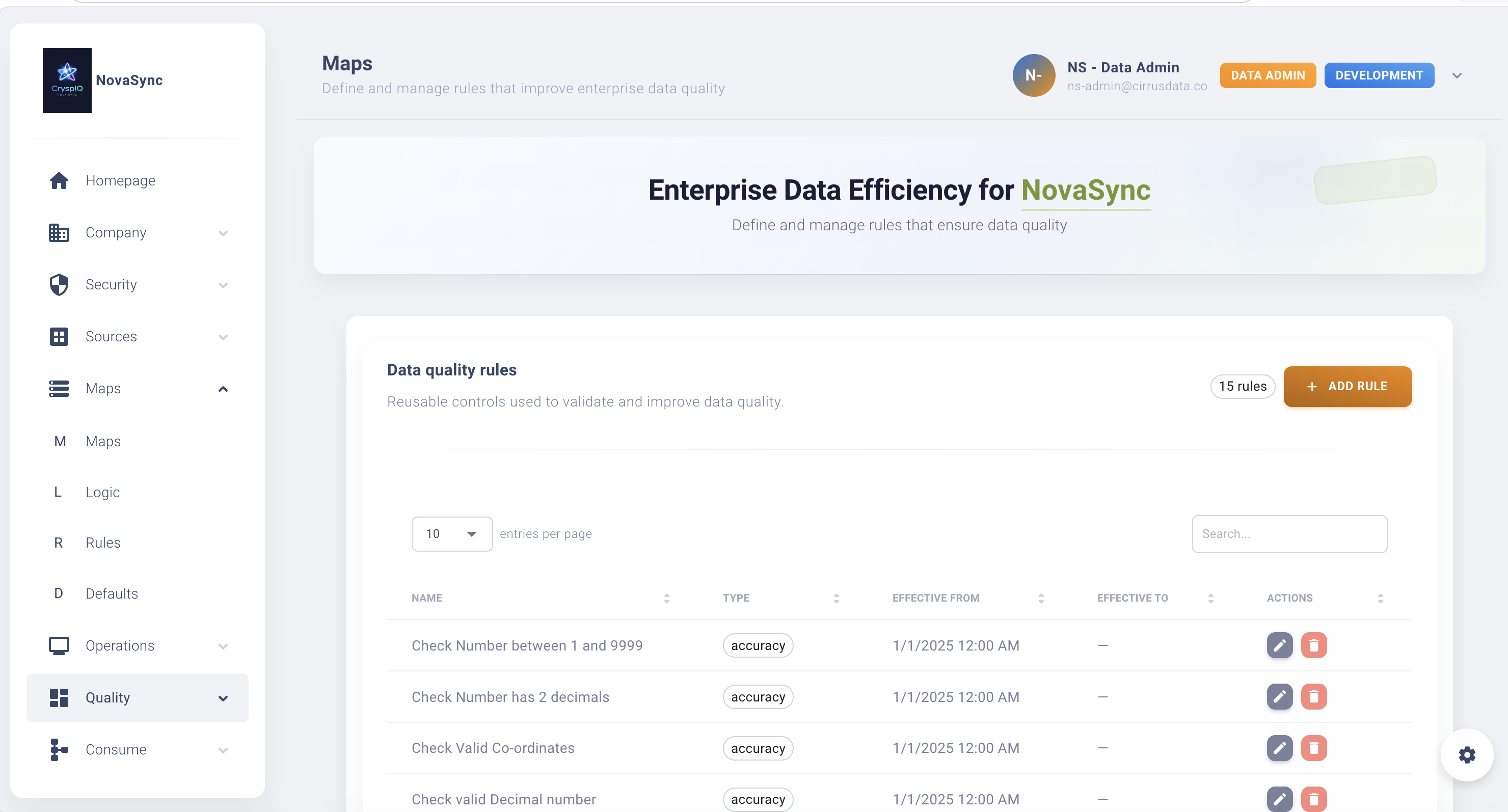
Create a Rule
To create a new Data Quality Rule:
- Open Maps → Rules.
- Select Add Rule.
- Enter a Rule Name.
- Select the Rule Type.
- Select the Data Quality Dimension.
- Enter a Description.
- Configure the validation logic.
- Save the rule.
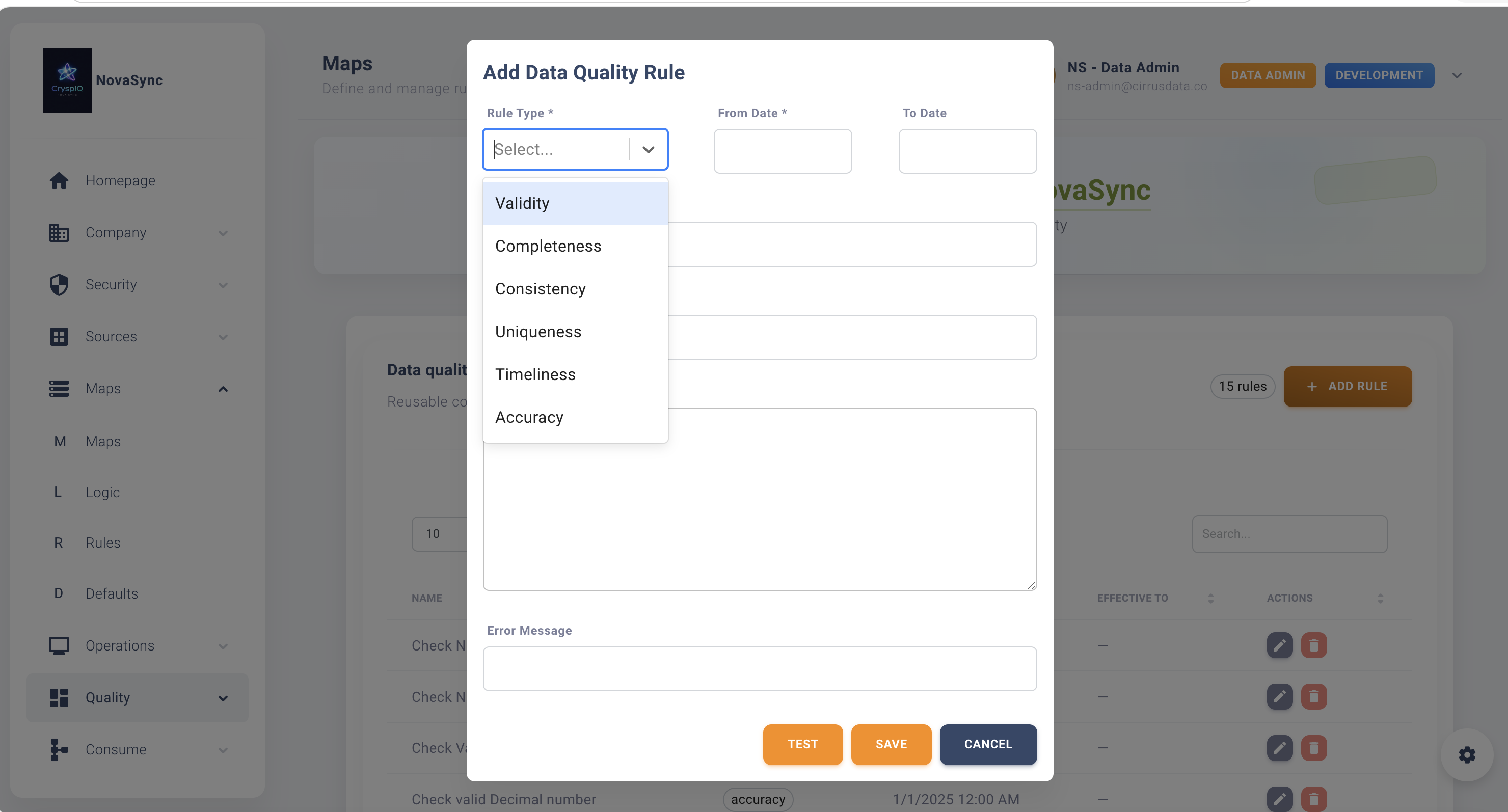
After saving, the rule becomes available for use in Message Maps.
Rule Name
Use a clear name that explains what the rule checks.
Good examples:
Validate Email Format
Check Mandatory Customer ID
Validate Positive Invoice Amount
Check Start Date Before End Date
Validate ABN
Avoid:
Rule1
TestRule
NewValidation
Description
Use the description to explain:
- What the rule checks
- Why the rule is required
- Which data quality dimension it supports
- What happens when the rule fails
Example:
Validates that Email Address follows a valid email format. This supports the Validity data quality dimension.
Configure Rule Logic
The configuration depends on the rule type.
Regex Rule
Use regex rules for pattern and format validation.
Examples include:
- Email format
- Phone number format
- Postcode format
- Alphanumeric codes
- Date patterns
- Identifier formats
Example:
^[A-Z0-9_-]+$
This may be used to validate a code that allows uppercase letters, numbers, underscores and dashes.
Python Script
Use Python scripts for custom validation logic.
Examples include:
- Complex field comparisons
- Conditional checks
- Value range checks
- Derived validation
- Multi-field rules
.NET Function
Use .NET functions for reusable enterprise validation logic.
Examples include:
- Standard business validations
- Enterprise reference checks
- Shared calculation rules
- High-performance validation routines
API Call
Use API calls when validation must be performed by an external service.
Examples include:
- Address validation
- ABN or company number validation
- Credit checks
- Reference data validation
- Geocoding validation
Apply a Rule to a Message Map
Once a rule has been created, it can be assigned to a field within a Message Map.
Example:
| Source Field | Target Field | Rule | Dimension |
|---|---|---|---|
| EmailAddress | Validate Email Format | Validity | |
| CustomerId | Entity Business Key | Check Mandatory Customer ID | Completeness |
| InvoiceAmount | Fact Value | Validate Positive Amount | Accuracy |
| InvoiceNumber | Fact Business Key | Check Unique Invoice Number | Uniqueness |
Open the Create Message Maps guide
View Existing Rules
To review a rule:
- Open Maps → Rules.
- Locate the rule.
- Open the rule details.
Use this when:
- Reviewing data quality logic
- Investigating failed records
- Understanding why data was flagged
- Checking rule ownership and purpose
- Reviewing rule alignment to DAMA dimensions
Edit a Rule
To update a rule:
- Open Maps → Rules.
- Locate the rule.
- Select Edit.
- Update the required details.
- Save the changes.
Common updates include:
- Updating regex logic
- Updating Python script logic
- Updating API endpoint details
- Updating descriptions
- Changing the associated data quality dimension
- Aligning with new business rules
Changing a rule may affect future data quality outcomes wherever the rule is used.
Review all related Message Maps before making significant changes.
Delete a Rule
To delete a rule:
- Open Maps → Rules.
- Locate the rule.
- Select Delete.
CryspIQ® prevents deletion if the rule is currently being used.
In-Use Validation
Rules assigned to active Message Maps cannot be deleted.
Example:
Delete Failed

Rule is currently being used by one or more Message Maps.
The rule must first be removed from all active mappings before it can be deleted.
This protects existing processing configurations from being broken accidentally.
Finding Where a Rule Is Used
Before deleting or changing a rule, review:
- Message Maps
- Target fields
- Source fields
- Data quality dashboards
- Processing dependencies
This helps Data Administrators understand the impact of a change.
Best Practices
Align Every Rule to a Dimension
Each rule should be linked to a data quality dimension.
This makes quality reporting easier and helps Data Stewards understand the type of issue detected.
Make Rules Reusable
Design rules that can be reused across multiple Source Messages and Message Maps.
For example:
Validate Email Format
is better than:
Validate Email Format for Customer File Only
unless the rule is genuinely specific.
Keep Rules Focused
Each rule should check one clear condition.
This makes failures easier to explain and resolve.
Use Clear Failure Messages
A good failure message helps Data Stewards understand what needs to be fixed.
Example:
Email Address is not in a valid format.
Test Before Production Use
Test rules before applying them to production mappings.
This is especially important for:
- Python scripts
- API calls
- .NET functions
- Complex regex logic
Troubleshooting
Rule Not Applied
Check:
- The rule has been assigned to the Message Map.
- The correct source and target fields are mapped.
- The map is active.
- Processing completed successfully.
Rule Flags Too Many Records
Review:
- Rule logic
- Regex pattern
- Input data values
- Data type assumptions
- Business rule interpretation
Rule Does Not Flag Expected Issues
Check:
- Rule assignment
- Input values
- Case sensitivity
- Null handling
- Rule execution order
Cannot Delete Rule
Check whether the rule is assigned to a Message Map.
Remove dependencies before attempting deletion.
API Rule Fails
Check:
- API endpoint availability
- Authentication details
- Network access
- Request format
- Response format
- API timeout behaviour
Relationship to Defaults and Methods
Rules work alongside other mapping components.
| Component | Purpose |
|---|---|
| Defaults | Supply missing values |
| Methods | Prepare and enrich data |
| Data Quality Rules | Validate incoming data |
| Message Maps | Apply business context |
Together these components help turn raw source data into trusted, standardised and quality-controlled enterprise data.
Related Guides
- Create Message Maps
- Methods
- Defaults
- Source Messages
- Upload Source Data
- Data Quality Dashboard
- Navigation
Next Steps
After creating a Data Quality Rule:
- Apply the rule to a Message Map.
- Test the mapping process.
- Review any flagged data quality issues.
- Check Mapper and Load Operations.
- Review Data Quality dashboards.
- Confirm Data Stewards understand the rule and failure message.
Data Quality Rules help ensure source data is checked, governed and trusted before it becomes part of the CryspIQ® Enterprise Data Model.