Manage Methods
The Methods page allows Data Administrators to manage the library of transformation methods used during the mapping process.
Methods help transform, enrich and standardise incoming source data before it is loaded into the CryspIQ® Enterprise Data Model.
Methods are applied through Message Maps and can be used to clean values, format data, call external logic or apply business rules as data arrives.
Overview
A method is reusable transformation logic that can be applied to source data during mapping.
Methods can be used to:
- Standardise values
- Clean source data
- Preparation formats
- Derive new values
- Validate business rules
- Enrich records using external services
- Prepare data for reporting, analytics and AI
Method Types
CryspIQ® supports different types of transformation methods, including:
| Method Type | Description |
|---|---|
| Python Script | Executes Python logic to transform or validate data. |
| Azure Function | Calls serverless logic hosted in Microsoft Azure. |
| .NET Function | Executes reusable .NET transformation logic. |
| API Call | Calls an external API to enrich or validate data. |
When Methods Are Used
Methods are used during the mapping process.
Source Data
      ↓
Message Map
      ↓
Apply Defaults
      ↓
Apply Methods
      ↓
Apply Data Quality Rules
      ↓
CryspIQ® Enterprise Data Model
Methods are typically used when a value needs more than a simple default.
Examples
Standardise Text
Convert source values into a consistent format.
"active", "Active", "ACTIVE"
        ↓
"Active"
Convert Date Formats
Convert source dates into a consistent enterprise format.
31/05/2026
        ↓
2026-05-31
Derive a Value
Calculate a new value from source fields.
Quantity × Unit Price = Total Amount
Call an External API
Validate or enrich a record using an external service.
Examples include:
- Address validation
- ABN or company validation
- Geocoding
- Reference data lookup
- Risk scoring
Before You Start
Before creating a method, ensure:
- You have Data Administrator access.
- The transformation requirement is understood.
- The expected input and output are known.
- Any external API or Azure Function is available.
- The method has been tested outside production where required.
Methods should be reusable wherever possible.
Create methods that solve common transformation problems rather than one-off fixes.
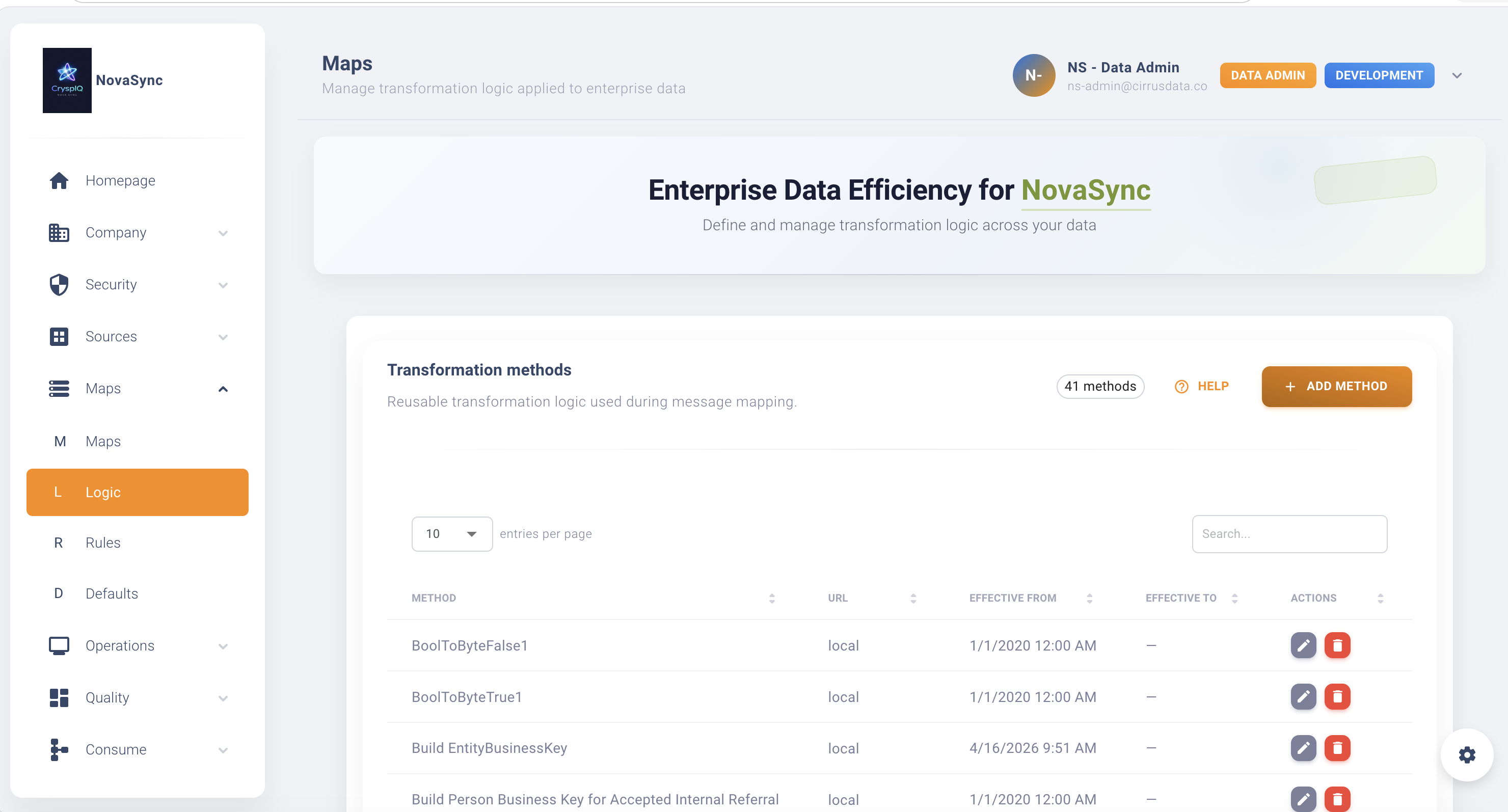
Navigate to Methods
From the main menu navigate to:
Maps → Methods
The Methods page displays the transformation method library.
Create a Method
To create a new method:
- Open Maps → Methods.
- Select Add Method.
- Enter a Method Name.
- Choose the Method Type.
- Enter a Description.
- Configure the method logic or endpoint.
- Save the method.
After saving, the method becomes available for use in Message Maps.
Method Name
Use a clear name that explains what the method does.
Good examples:
Standardise Status
Format Date
Calculate Total Amount
Validate ABN
Lookup Country Code
Avoid:
Method1
Test
NewMethod
Description
Use the description to explain:
- What the method does
- When it should be used
- What inputs are expected
- What output is returned
Example:
Converts source status values into the approved enterprise status list.
Configure Method Logic
The configuration depends on the method type.
Python Script
Use Python scripts for transformations that can be executed as script-based logic.
Examples:
- Text formatting
- Date parsing
- Value conversion
- Derived calculations
Azure Function
Use Azure Functions when transformation logic is hosted externally in Azure.
Examples:
- Address validation
- External reference lookups
- Complex enrichment logic
- Shared enterprise services
.NET Function
Use .NET functions for reusable internal transformation logic.
Examples:
- Standard enterprise calculations
- Common formatting rules
- Shared business validation logic
API Call
Use API calls when the method must interact with an external service.
Examples:
- Validate a business number
- Enrich customer information
- Retrieve reference data
- Perform external quality checks
Apply a Method to a Message Map
Once a method has been created, it can be applied to fields within a Message Map.
Example:
| Source Field | Target Field | Method |
|---|---|---|
| Status | Status | Standardise Status |
| TransactionDate | Fact Date | Format Date |
| Quantity + UnitPrice | Fact Value | Calculate Total Amount |
| ABN | Business Identifier | Validate ABN |
Open the Create Message Maps guide
View Existing Methods
To review a method:
- Open Maps → Methods.
- Locate the method.
- Open the method details.
Use this when:
- Reviewing mapping logic
- Investigating transformation results
- Confirming how source data is standardised
- Understanding dependencies before making changes
Edit a Method
To update a method:
- Open Maps → Methods.
- Locate the method.
- Select Edit.
- Update the required details.
- Save the changes.
Common updates include:
- Updating transformation logic
- Updating API endpoints
- Changing descriptions
- Aligning with new business rules
Changing a method may affect future data processing wherever the method is used.
Review all related Message Maps before making significant changes.
Delete a Method
To delete a method:
- Open Maps → Methods.
- Locate the method.
- Select Delete.
CryspIQ® prevents deletion if the method is currently being used.
In-Use Validation
Methods assigned to active Message Maps cannot be deleted.
Example:
Delete Failed

Method is currently being used by one or more Message Maps.
The method must first be removed from all active mappings before it can be deleted.
This protects existing processing configurations from being broken accidentally.
Finding Where a Method Is Used
Before deleting or changing a method, review:
- Message Maps
- Target fields
- Data quality rules
- Processing dependencies
This helps administrators understand the impact of a change.
Best Practices
Make Methods Reusable
Design methods that can be reused across multiple maps.
Keep Logic Focused
Each method should perform a clear, specific task.
For example:
Format Date
is better than:
Clean Everything
Document Inputs and Outputs
Always describe:
- Expected input value
- Output value
- Error behaviour
- Any external dependency
Test Before Production Use
Test methods before applying them to production mappings.
This is especially important for:
- API calls
- Azure Functions
- .NET functions
- Complex Python scripts
Avoid Hiding Data Quality Issues
Methods should improve data consistency, but should not hide poor source data.
Where data is invalid, consider using a Data Quality method or rule instead.
Troubleshooting
Method Not Applied
Check:
- The method has been assigned to the Message Map.
- The correct source and target fields are mapped.
- Processing completed successfully.
Unexpected Output
Review:
- Method logic
- Input values
- Preparation rules
- Related defaults
- Related data quality checks
Cannot Delete Method
Check whether the method is assigned to a Message Map.
Remove dependencies before attempting deletion.
API Method Fails
Check:
- API endpoint availability
- Authentication details
- Network access
- Request format
- Response format
Azure Function or .NET Function Fails
Check:
- Function configuration
- Runtime errors
- Permissions
- Logs
- Input and output format
Relationship to Defaults and Data Quality
Methods work alongside other mapping components.
| Component | Purpose |
|---|---|
| Defaults | Supply missing values |
| Methods | Prepare and enrich data |
| Data Quality Rules | Validate incoming data |
| Message Maps | Apply business context |
Together these components help turn raw source data into trusted, standardised enterprise data.
Related Guides
Next Steps
After creating a method:
- Apply the method to a Message Map.
- Test the mapping process.
- Review the transformed data.
- Check Mapper and Load Operations.
- Validate reporting, analytics and data quality outcomes.
Methods help ensure source data is transformed, standardised and enriched before it becomes part of the CryspIQ® Enterprise Data Model.